Overview
AI Assistant Analytics gives you visibility into how users are interacting with the Userlane AI Assistant. It helps you understand what topics users are asking about, whether the assistant is responding with relevant content, and where content gaps exist in your guidance.
Use this section of the portal to ensure users are getting the help they need.
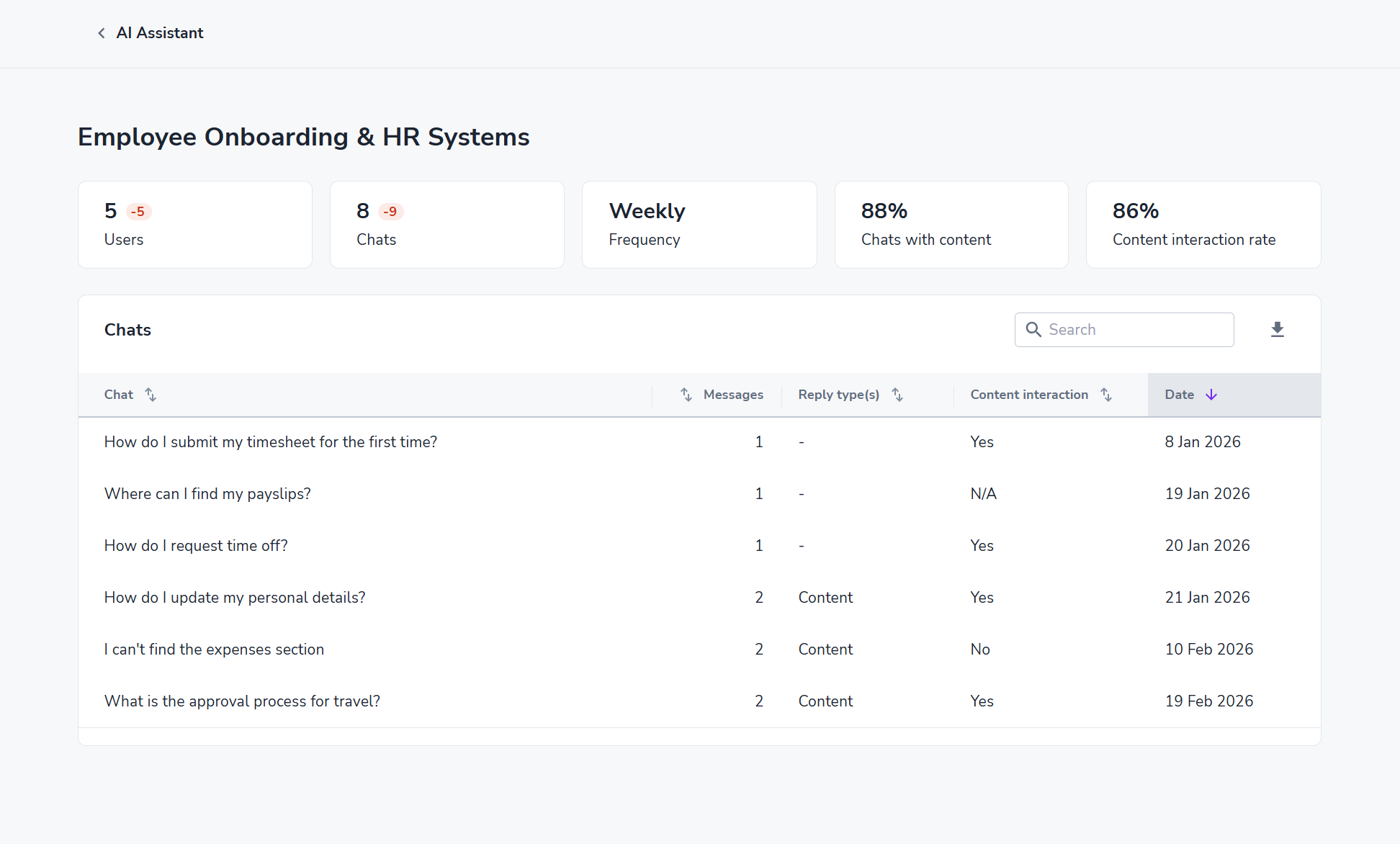
Where to find it
AI Assistant Analytics is accessible from the Userlane Portal under the Content analytics > AI Assistant section. You must have an active AI Assistant enabled for your account to see analytics data.
Key features
Topic clustering
Chats are automatically grouped into topics so you can quickly identify what themes users are asking about most. A single chat can belong to multiple topics.
- Topics improve over time as more data is collected
- Emerging topics are labeled "new"
- Click into a topic to browse all related conversations
Chat browsing
Browse and read individual user conversations directly within the analytics view. Click on any chat to open it in a side panel for full context.
- Conversations are listed with message count, reply type, and content interaction status
Content coverage
See at a glance whether the AI Assistant responded to user questions with or without relevant content. This metric helps you:
- Identify gaps in your guidance content
- Prioritize which areas to expand or improve
- Measure the impact of content updates over time
Privacy
User IDs are not displayed within chat analytics. This ensures individual conversations remain private while still providing actionable aggregate insights.
Metrics reference
| Users | Number of unique users who started a chat in the selected period |
| Chats | Total number of chat sessions |
| Frequency | How often users are engaging with the AI Assistant (e.g., monthly) |
| Chats with content | Percentage of chats where the assistant replied using your content |
| Reply type | Indicates how the assistant generated its response (e.g., knowledge base) |
| Content interaction | Whether the user interacted with content surfaces shown in the response (Yes/No) |
- Check content coverage regularly to find unanswered questions and create targeted guides or messages.
- Topic clustering improves as your dataset grows, give it time before drawing strong conclusions from new topics.
- Click on the chat and use the side panel to read full conversations